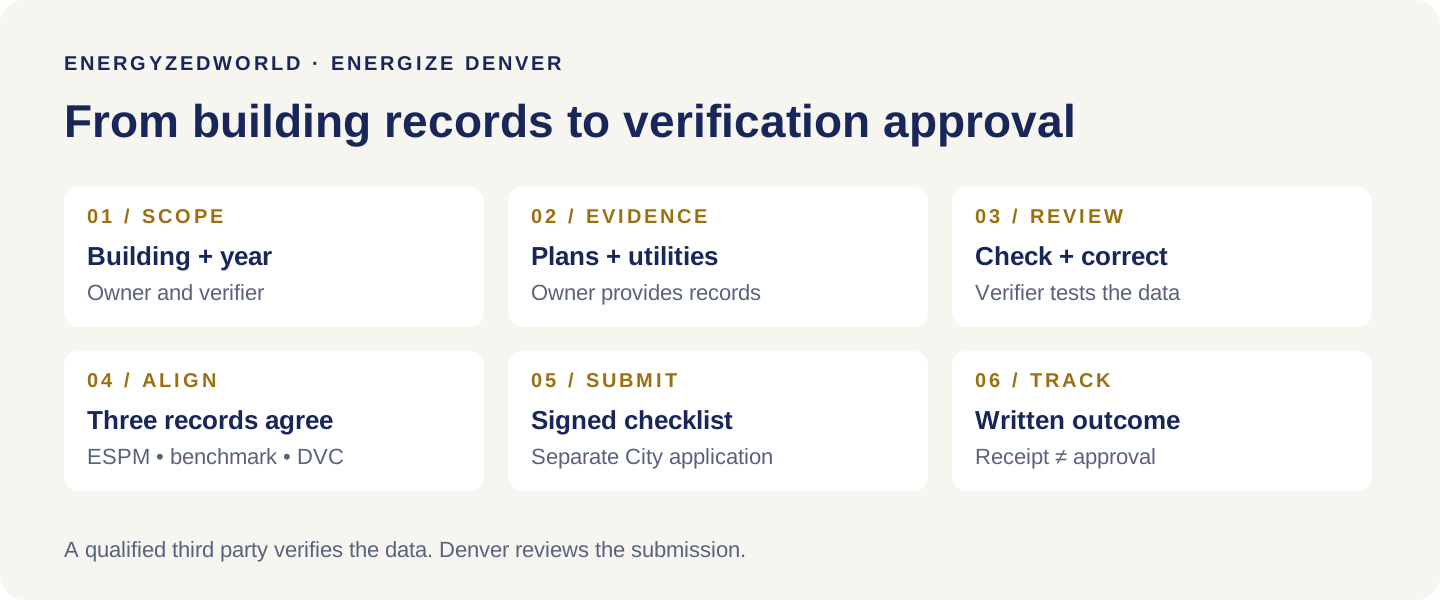
To complete Energize Denver data verification, a qualified third party checks your building records against ENERGY STAR Portfolio Manager, resolves discrepancies, aligns the benchmark submitted to Denver, and submits a signed Data Verification Checklist for City review. Saving a checklist—or receiving an upload receipt—does not finish the process. Keep the City’s approval.
For a building owner, facility manager or general manager, the task begins with access and good records. For a Certified Energy Manager (CEM) or Professional Engineer (PE), it requires a defensible review of the property, its uses and its energy data.
This guide explains both sides through an anonymized AIM Dynamics assignment that received checklist approval on October 12, 2026. The customer’s identity, address, building identifiers and energy figures are withheld.
Watch the tutorial: the 14-minute video above follows the same process. Jump to Portfolio Manager checklist generation at 6:09, Denver portal submission at 9:54, or the anonymized approval case at 11:06.
What Energize Denver data verification actually checks
Benchmarking reports a building’s energy use. Data verification checks whether the information behind that report accurately represents the building. An energy audit goes further to assess systems and improvement opportunities; a verification approval does not establish that those improvements have been completed.
Denver’s large-building verification requirements generally apply to covered buildings of 25,000 square feet and larger. The initial deadline was June 1, 2026. For that requirement, the City accepts calendar-year 2024 or 2025 data and recognizes qualifying prior target-adjustment verification. A building-specific notice or approved extension needs its own review; do not assume another property’s deadline applies to yours.
Verification is also required for the final target-year measurement period. For example, a building evaluated on 2032 data would verify that data for the submission due June 1, 2033. Target-adjustment applications can require a different data year. Check the purpose before generating the checklist. Denver verification requirements
Who qualifies? Denver recognizes a CEM from AEE, a U.S.-licensed PE or registered architect, an ASHRAE BEAP, an EMA EMP, and other credentials specifically recognized by CASR. Credentials must be in good standing. The verifier cannot be the building owner or an employee of the owner.
Current written guidance permits an eligible verifier to have prepared the benchmark. Denver’s August 2025 training videos contain an older restriction on this point. Follow the September 2026 technical guidance, not that portion of the older videos. Technical Guidance, sections 4.7.2–4.7.4
How many Denver buildings still need data verification?
691 of 2,700 building records were marked “Data Verification Requirement Satisfied = False” in Denver’s September 22, 2026 master dataset. That is 25.6% of the records, downloaded and analyzed on October 12.
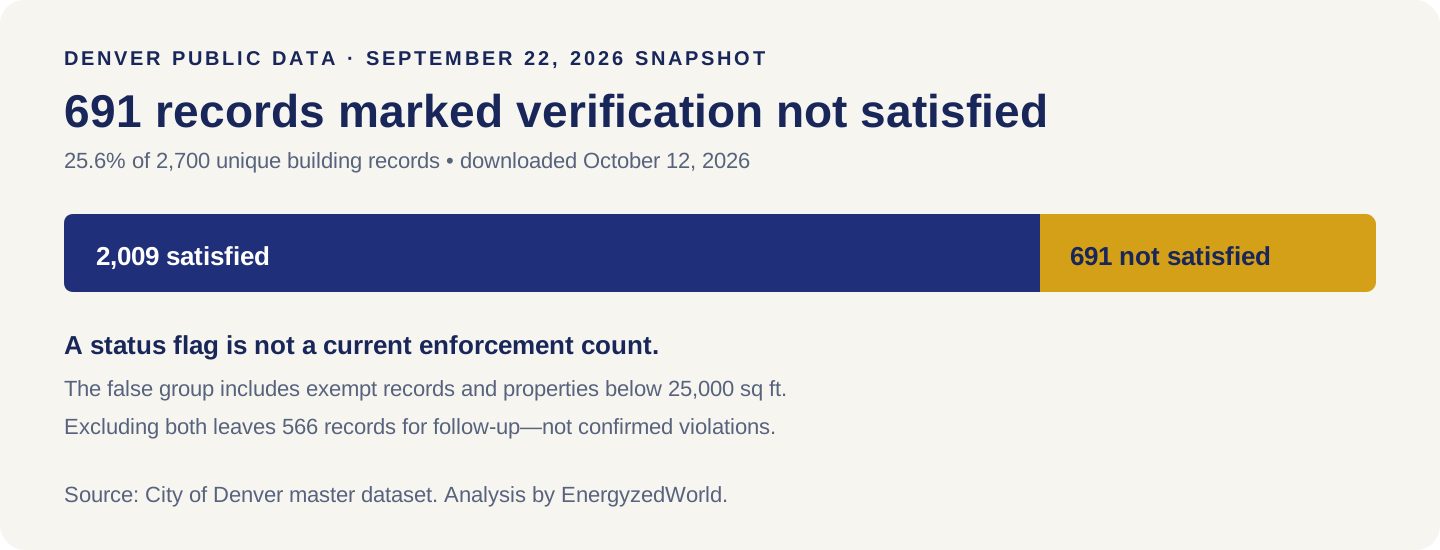
This is the latest public workbook update identified for this guide, not a live count of buildings legally overdue. Of the 691 records, 62 carry an exempt benchmarking status and 101 have recorded floor areas below 25,000 square feet. These groups overlap. Excluding both leaves 566 records for follow-up, not 566 confirmed violations.
Another useful distinction: 332 of the 691 records show benchmarking status “in compliance” while their verification flag remains false. A successful annual benchmark and an accepted verification are separate checkpoints.
Method: count unique Building IDs in the 2025MasterDataSet Report sheet, group the verification Boolean, then screen the recorded compliance status and floor area. Newly approved submissions may not yet appear. An owner’s current City record and correspondence take precedence over this snapshot. Denver master dataset
Field note: from a violation notice to checklist approval
For one Denver commercial building, AIM Dynamics reviewed supporting records and the Portfolio Manager entry, addressed a data discrepancy, prepared the verification documentation and followed the submission through City review.
The sequence matters:
| Date in 2026 | What happened | What the owner could conclude |
|---|---|---|
| October 5 | The signed checklist was submitted; a receipt was issued. | Filed and awaiting review. |
| October 8 | A Notice of Violation arrived. | The notice required attention despite the earlier submission. |
| October 9 | The City explained that the notice reflected its September 1 compliance snapshot and confirmed receipt of the checklist. | The application was in review; the notice and submission had different reference dates. |
| October 12 | The City approved the checklist for 2025 energy use. | The initial data verification requirement was complete, as stated in the approval. |
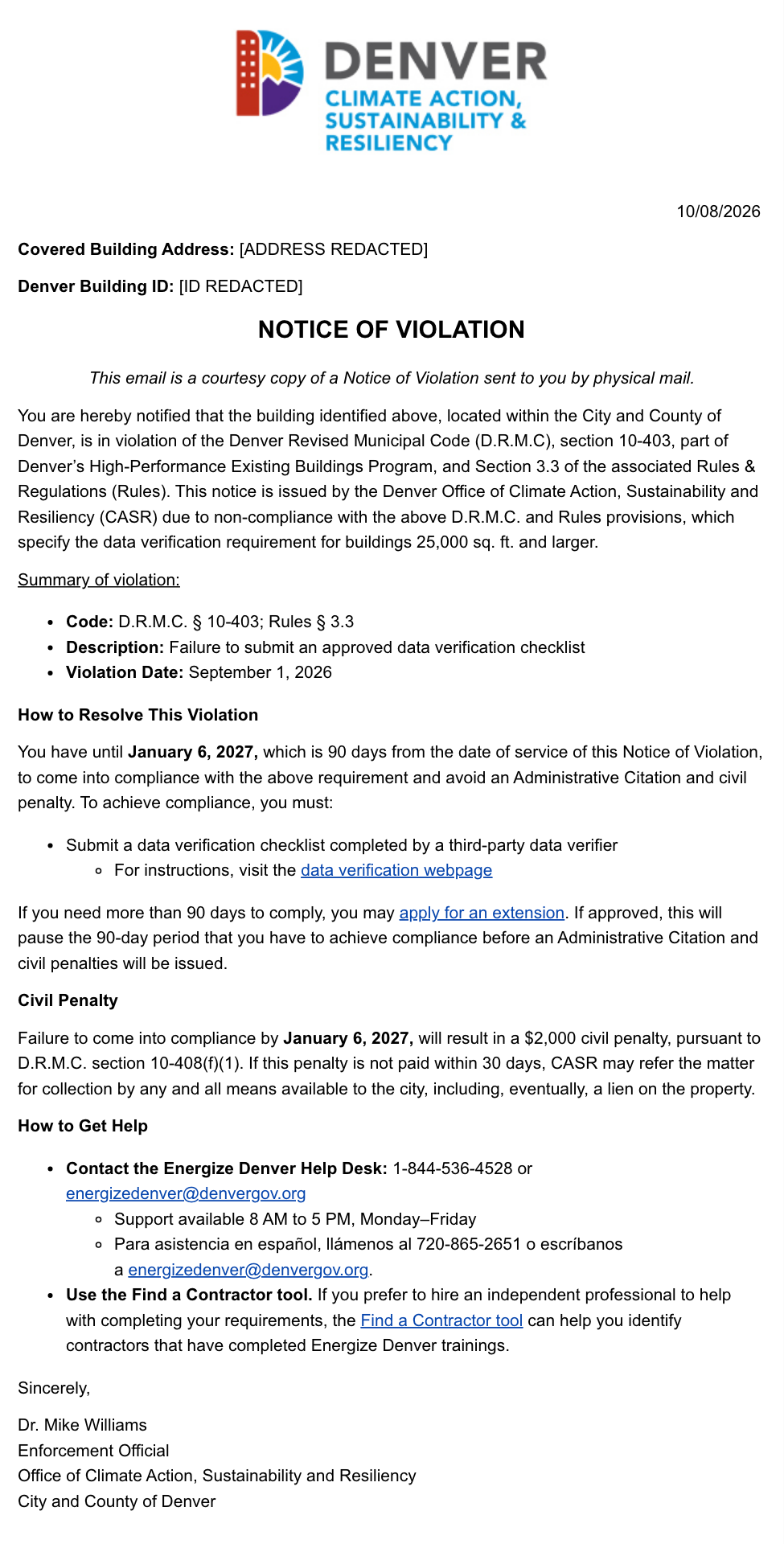
Actual City email body, rendered with identifying fields replaced before capture. The January 6, 2027 date and potential penalty belong to this particular notice; they are not a citywide deadline or proof of a penalty paid.
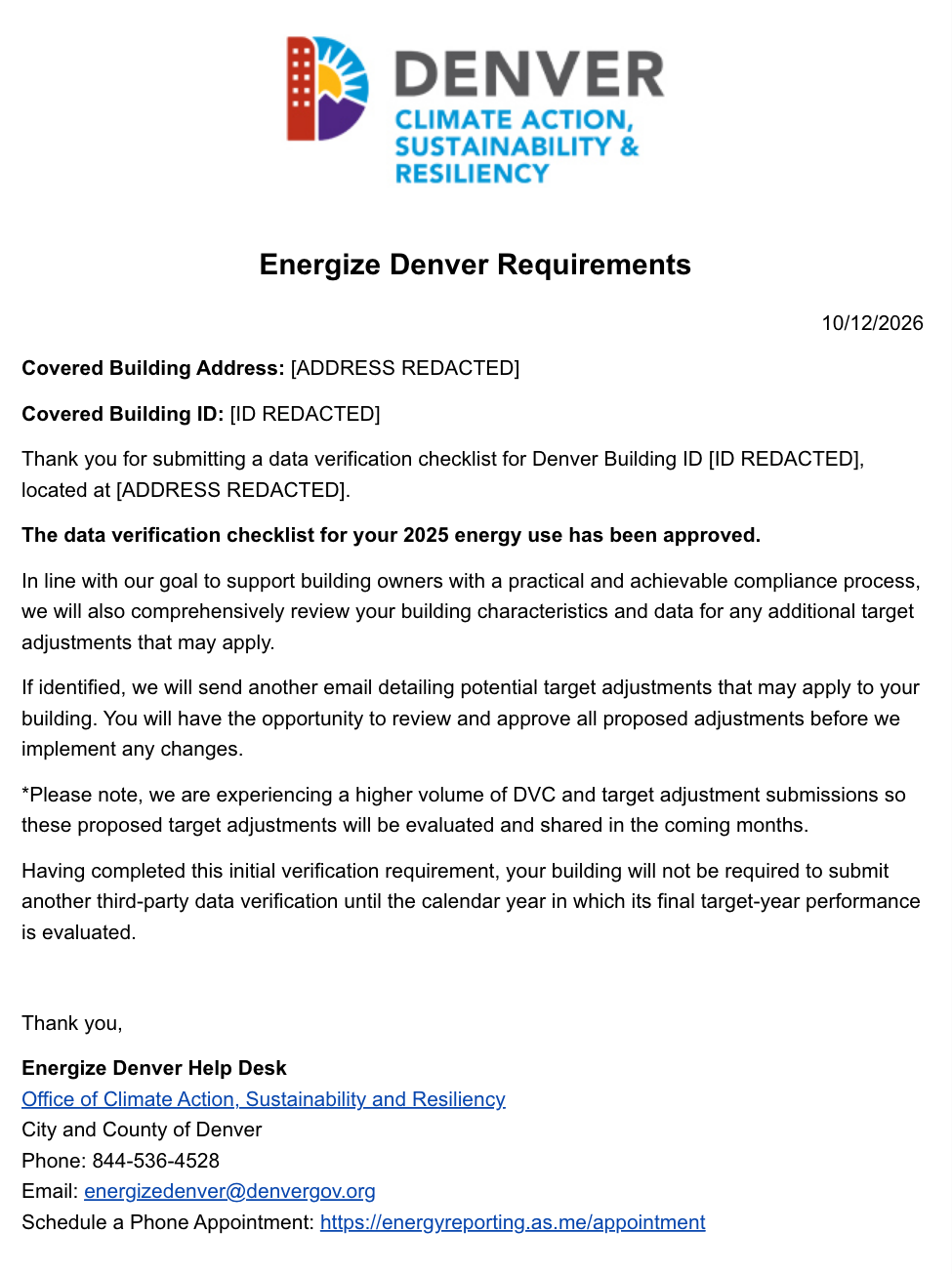
Actual approval email body, with identifying fields redacted. Approval covers the checklist. The email describes possible future target-adjustment review separately.
AIM’s follow-up connected the submitted checklist with the notice and obtained a clear written outcome. We do not interpret the approval as proof that every performance obligation was met, that a target adjustment was approved, or that a separate notice was formally rescinded. Owners should retain the approval and confirm any remaining portal or enforcement status with the help desk.
How to verify data in Portfolio Manager and submit it to Denver
Step 1 — Confirm the building, purpose and data year
Owner and verifier: identify the Denver Building ID, the Portfolio Manager Property ID, the applicable requirement and the calendar year. These identifiers are different. Record who will correct data, who will sign, and who will submit.
For a 2025 energy-use checklist, use January 1–December 31, 2025. “Reported in 2026” does not mean “2026 energy data.” Check the property’s existing verification or approved target-adjustment record before duplicating work.
Step 2 — Connect accounts, then share the property
Owner: in Portfolio Manager, open Contacts → Add New Contacts/Connections. Find the verifier using their confirmed account details and send a connection request. The verifier accepts it in Notifications.
Then open Sharing → Share (or Edit Access to) a Property. Select the property, choose the verifier’s account and use Personalized Sharing & Exchange Data to set the access described in Denver’s guide, including Full Access where needed. Share the property; the verifier accepts the property-sharing request.
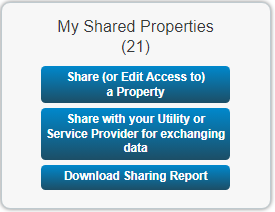
A City-published training example, not the customer’s account.
Check before continuing: the verifier can open the correct property and the necessary meter records. A connection alone is not property access. Share through account permissions rather than sharing a password.
Step 3 — Assemble the evidence
Owner: provide plans or other reliable area records, a breakdown of uses, operating information, utility account and meter lists, and energy records covering the verification year. Include tenant energy and aggregated utility data where relevant.
Verifier: confirm which meters and fuels serve the whole property, reconcile service addresses and review supporting information for generation, backup fuel or EV charging where applicable. An aggregated Portfolio Manager meter may represent several physical meters; do not assume its name proves complete coverage.
A useful working file links each assertion to its evidence: floor area to its measurement basis; use type to actual operations; energy totals to utility records. Resolve unexplained gaps rather than filling them with assumptions. Denver’s official verifier training discusses documentation at 8:15.
Step 4 — Generate a review checklist
Verifier: open Reporting in Portfolio Manager. Under ENERGY STAR Performance Documents, select Data Verification Checklist.
In Generate and Download Reports, select:
- ENERGY STAR Data Verification Checklist (energy data only).
- The correct property.
- Single Year, ending December 31 of the year being verified.
- The relevant contacts, including the verifying professional.
Generate and download the report. If no download appears, check the browser’s pop-up/download permission.
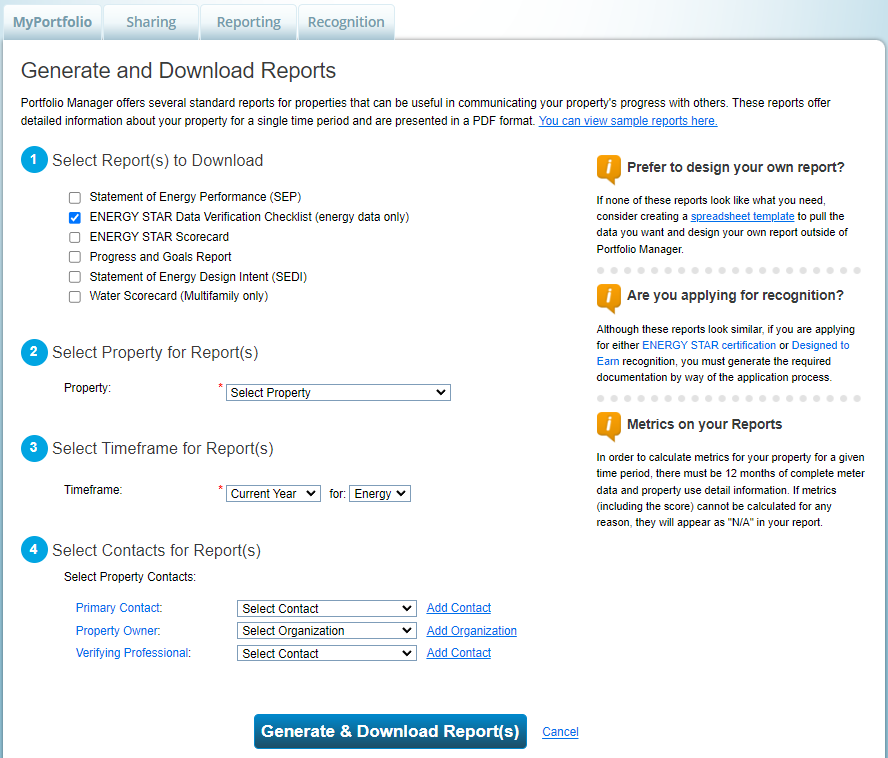

These are official training examples. The illustrated year is 2024; the anonymized case used 2025. Always select the year required for your own application.
Step 5 — Review the property, uses and energy
Verifier: work through the checklist against the evidence, rather than simply checking every box.
| Review area | Practical verification question |
|---|---|
| Whole property | Are the address, property boundary, primary use and gross floor area supported? |
| Property uses | Do the space-use categories and relevant use details represent actual operations? |
| Energy coverage | Are all applicable meters and fuels included for the entire year, without duplication? |
| Units and dates | Do units match the utility records, and do billing periods cover the year correctly? |
| Exceptions | Are gaps, unusual loads and unresolved discrepancies explained with evidence? |
Run Portfolio Manager’s Data Quality Checker as a screening tool; it does not replace the professional review. Do not treat rentable area as automatically equivalent to gross floor area. Do not convert energy quantities twice when correcting a unit label.
Denver does not automatically require a site visit; the verifier decides whether the evidence supports a signature without one. Current Denver guidance permits N/A for the checklist’s indoor environmental quality section. This is not an ENERGY STAR certification application, which has its own requirements.
Step 6 — Correct and align all three records
If the review finds discrepancies, agree on documented corrections, update Portfolio Manager and regenerate the checklist. The Portfolio Manager record, the benchmark submitted to Denver and the signed checklist must match for the same year.
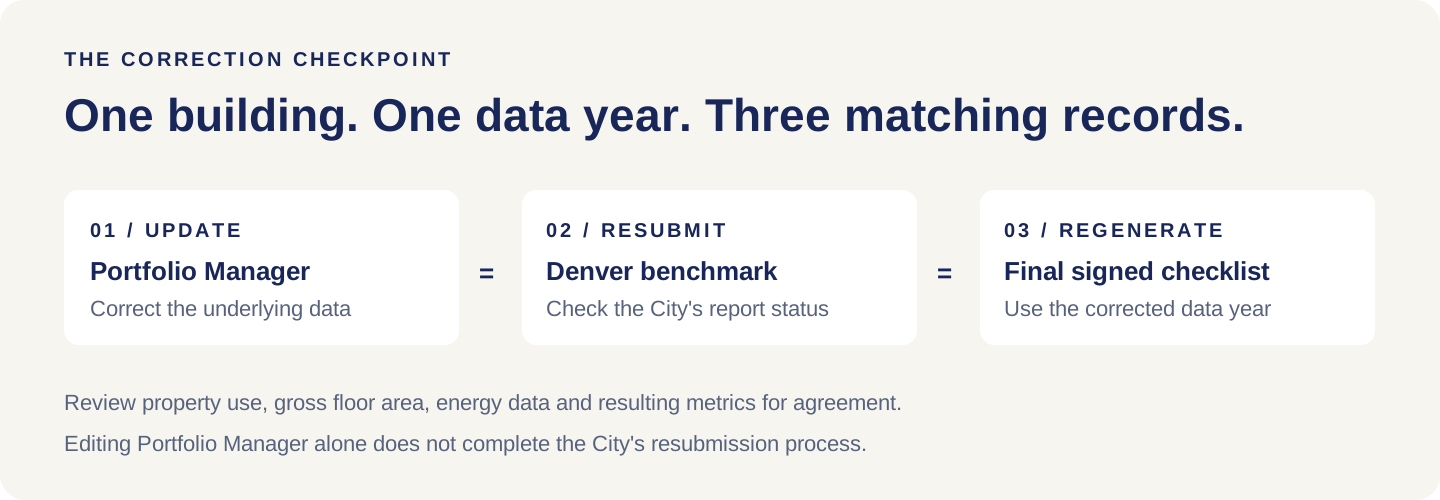
For the City’s benchmark, confirm that Portfolio Manager is shared with EnergizeDenver and that the Denver Building ID is correctly entered. In the Energize Denver Management Portal, use the claimed building’s Submit action on My Buildings / Dashboard Overview to submit the corrected report. Check the resulting status and any requested revisions. If the needed year or resubmission action is unavailable, contact the help desk rather than submitting a different year.
Do not assume an edit in Portfolio Manager automatically replaces the report the City has already reviewed. Reconcile the submitted result before signing the final checklist. Denver emphasized this three-way alignment again in its March 13, 2026 guidance email. The same requirement appears in the February 2026 guide, section 4.7.
Step 7 — Add verification information and sign the final checklist
In the property, go to Details → Verification → Add Verification Information. Enter the period ending December 31 of the verified year, the actual verification date, the verifier’s details and credential information; save the record.
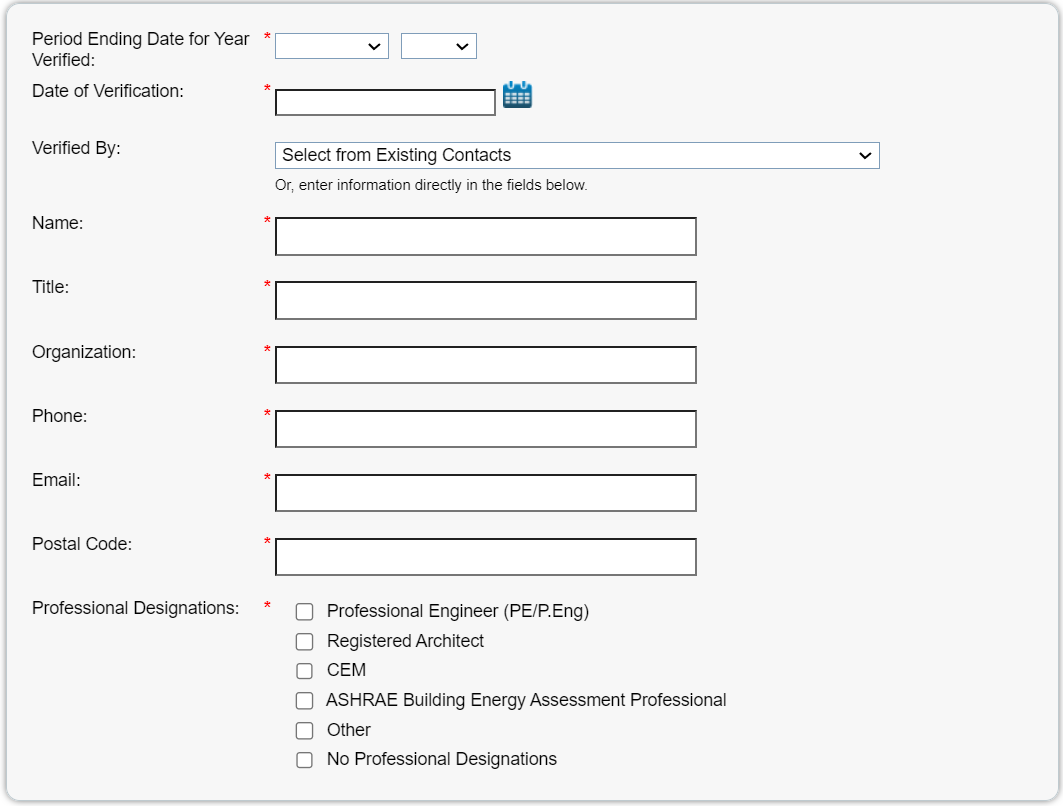
Finish the final checklist and add the verifier’s name, date and signature. Denver does not require a professional stamp in place of a signature. Retain the signed copy and supporting review record. Saving these details in Portfolio Manager does not submit the checklist to Denver.
Step 8 — Open Denver’s separate checklist application
Sign in to the Energize Denver Management Portal. The City’s verifier tutorial shows Forms and Applications → Available Forms → Data Verification Checklist Requirement Application. Its owner tutorial also shows a building-level Actions → Forms route. Labels can change; locate the checklist application for the correct building.
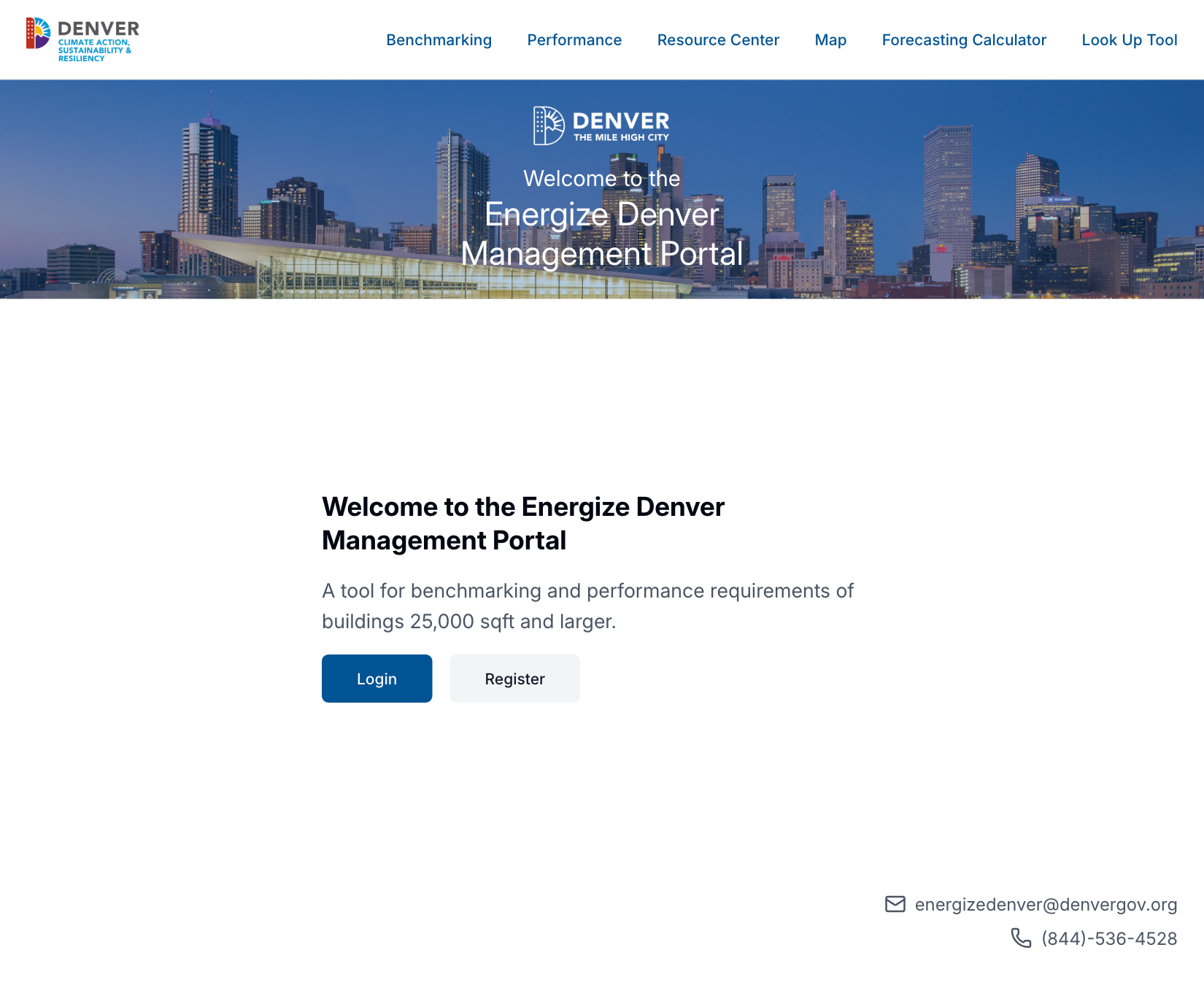
Live public portal entrance captured October 12, 2026. The authenticated menu sequence above comes from City training, not a screenshot of a customer’s account.
The City also provides the direct Data Verification Submission Form. Choose the checklist option for the standard route, complete the building/contact fields and select Next. Answer any prior target-adjustment question according to the actual approval record. If applying for a target adjustment, use that application’s instructions and required year.
Step 9 — Check the upload and submit
Confirm the correct Denver Building ID and responsible email, the correct calendar year, and agreement between the checklist and benchmark—including gross floor area and ENERGY STAR score where applicable. Check that the file includes the verifier’s signature and the full checklist, not just the signature page. Follow the current form’s required questions and upload instructions.
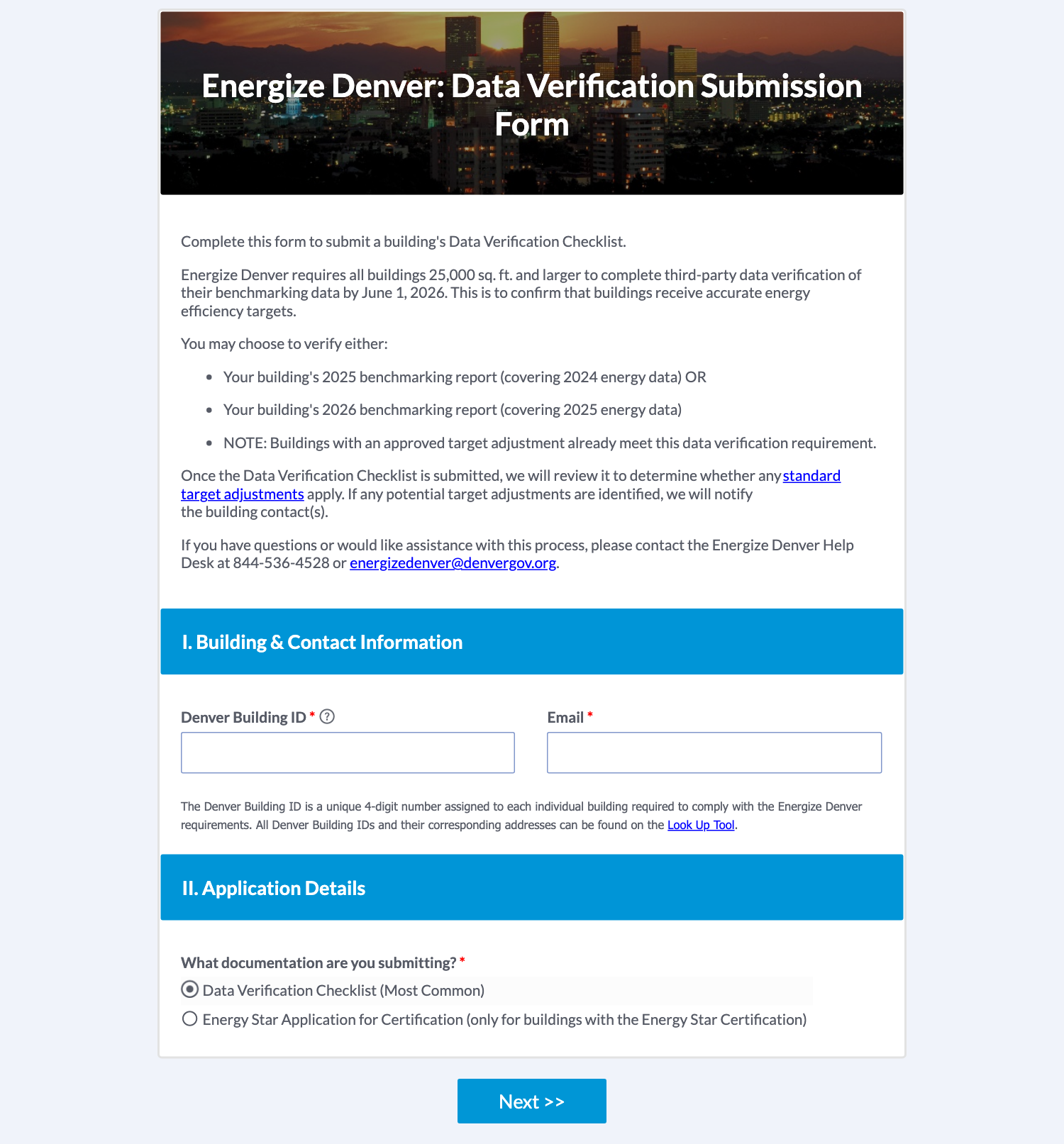
Submit once the packet is complete. Save the confirmation, date and application reference privately. Assign someone to monitor requests for clarification. Benchmarking submission and checklist submission are two separate actions.
Step 10 — Follow review through to a written outcome
A receipt means the application was received. It is not approval. Respond to City questions, keep revised versions traceable and retain the final decision.
If a violation notice arrives while review is pending, send the help desk the building identifier and submission reference privately and ask it to reconcile the records. Follow the deadline stated in that notice. If an extension is necessary, requesting it is not the same as having it approved.
When approval arrives, verify exactly what it approves and check the building’s status. Keep annual benchmarking, target adjustments and performance deadlines on the owner’s compliance calendar. City resources and help desk
Boston, Maryland and Seattle: similar evidence, different rules
Portfolio Manager is useful across jurisdictions, but a Denver approval does not transfer automatically. Boston and Seattle are city programs; Maryland’s BEPS is a state program.
| Program | Verification timing | Difference to check before taking the assignment |
|---|---|---|
| Boston BERDO | First reporting year, first emissions-compliance reporting year—2026 or 2031, as applicable—and every five years thereafter. | Follow Boston’s verifier eligibility, registration and reporting process. Do not assume a Denver credential or upload completes BERDO. |
| Maryland BEPS | Third-party verification starts with 2026 reporting and recurs every five years for covered buildings. | Use Maryland’s accepted credentials and documentation. Its guidance allows a qualified external benchmarking consultant to verify; in-house personnel do not satisfy the third-party role. |
| Seattle BEPS | Initial Benchmarking Verification phases in during 2027–2030 by building size, with subsequent five-year cycles. | Seattle specifies a Qualified Person separate from the entity submitting annual benchmarking. Do not carry Denver’s same-benchmarker rule into Seattle. |
Sources: Boston BERDO, Maryland BEPS, Maryland benchmarking, Seattle BEPS and Seattle benchmarking instructions. Reviewed October 12, 2026; confirm the property’s current schedule before filing.
What to prepare before you hire a verifier
Bring the verifier your City notice, correct building identifiers, existing benchmark status, Portfolio Manager access, area/use records and whole-building utility evidence. Agree on a scope that includes corrections, checklist preparation, submission responsibility and response to reviewer questions.
AIM Dynamics helps Colorado building teams connect benchmarking, data verification and energy audits to practical next steps. This case demonstrates documented follow-through to checklist approval; it does not promise the same timing or outcome for every building.
Start with your building’s requirements: check your Colorado building. For professional support, contact AIM Dynamics Energy Services. If the next question is how to improve performance, see our Colorado energy audit case studies.
Sources and training references
- Denver requirements: verification webpage and Technical Guidance v4, September 2026, sections 4.2 and 4.7.
- Screen instructions: February 2026 Data Verification Guide, including the City’s Portfolio Manager training examples reproduced above; EPA Portfolio Manager how-to guides.
- Official City videos: Data Verification for Building Owners and Data Verification for Data Verifiers, both August 14, 2025. Their restriction on the benchmark preparer is superseded by the current written guidance.
- Status count: Energize Denver 2025 Master Dataset, updated September 22, downloaded October 12, 2026. Counts are this article’s analysis, not a City statement of the current enforcement backlog.
- City correspondence: March 13, 2026 guide update and October 5–12 submission/review correspondence. Private originals are retained; only redacted notice bodies are reproduced.
- Other jurisdictions: Boston, Maryland and Seattle. Each program’s current rules govern its own filings.